ChatGPT Business Hub is OpenAI’s free dashboard for claiming your business inside ChatGPT. Launched in beta on 10 November 2026, it lets you prove the business is yours, correct the details ChatGPT shows, add your products, and see how often ChatGPT mentions you and sends clicks to your website. Think of it as a Google Business Profile with a small Search Console attached.
Most posts about it end with “claim yours now”. This guide covers how to claim it, what the numbers mean, and the part those posts skip: what you agree to when you do. Facts checked on 15 November 2026.
What is ChatGPT Business Hub?
Business Hub is the dashboard of Businesses in ChatGPT, a new OpenAI programme for companies. OpenAI says 1.2 billion people use ChatGPT every week, and more of them use it to compare products and choose who to buy from. When a business appears in an answer, people can open its ChatGPT profile. Business Hub is where you manage that profile.
It is not the same as ChatGPT Business, the paid workspace plan for teams. You do not need that plan, an ads account or an Enterprise contract to claim a business.
What do you get, and who can use it today?
| Feature | What it does | Who can use it today |
|---|---|---|
| Profile | Website, description, category, logo, delivery and return policy, cover photo | Eligible businesses wherever ChatGPT is available. Local shops and restaurants: only an existing US listing |
| Product feed | Current prices and stock, by CSV or Shopify | Verified businesses that sell products |
| Insights | Mentions, website clicks and top discovery topics over the last 28 days | Verified businesses, once activity passes a reporting threshold |
| Business Agent | A chat on your profile that answers customer questions and links to your site | Eligible ecommerce and online service businesses in the US |
OpenAI reviews profile changes before they appear, and ChatGPT can still draw on other sources. The Business Agent explains products and policies only: it cannot take orders, make bookings or check a customer’s order.
How do you claim your business in ChatGPT?
- Sign in to ChatGPT and open Business in the sidebar, or go to chatgpt.com/business-hub. Search for your business by name.
- Pick the matching listing. If you run an eligible online business and it is not listed, you may be able to add it.
- Verify with one of the methods offered: a code by phone or business email, a DNS TXT record on your domain, or your Shopify store.
- Wait for OpenAI to approve the claim, then complete identity verification with Persona. You may need a government ID, business registration details and proof that you can represent the business. Only after Persona approval can you publish changes, connect a feed, see Insights and get the blue check.
Two practical notes. If you verify by DNS, add the record and verify straight away: one user on OpenAI’s community forum reports a 30-minute window. And outside the US, the same forum thread has people stuck at the Persona step: UK sole traders asked for a VAT number they do not have, and an Australian business asked for a US registration number. Make sure the name, address and tax number you enter match your official records exactly.
What do mentions and clicks mean in Business Hub?
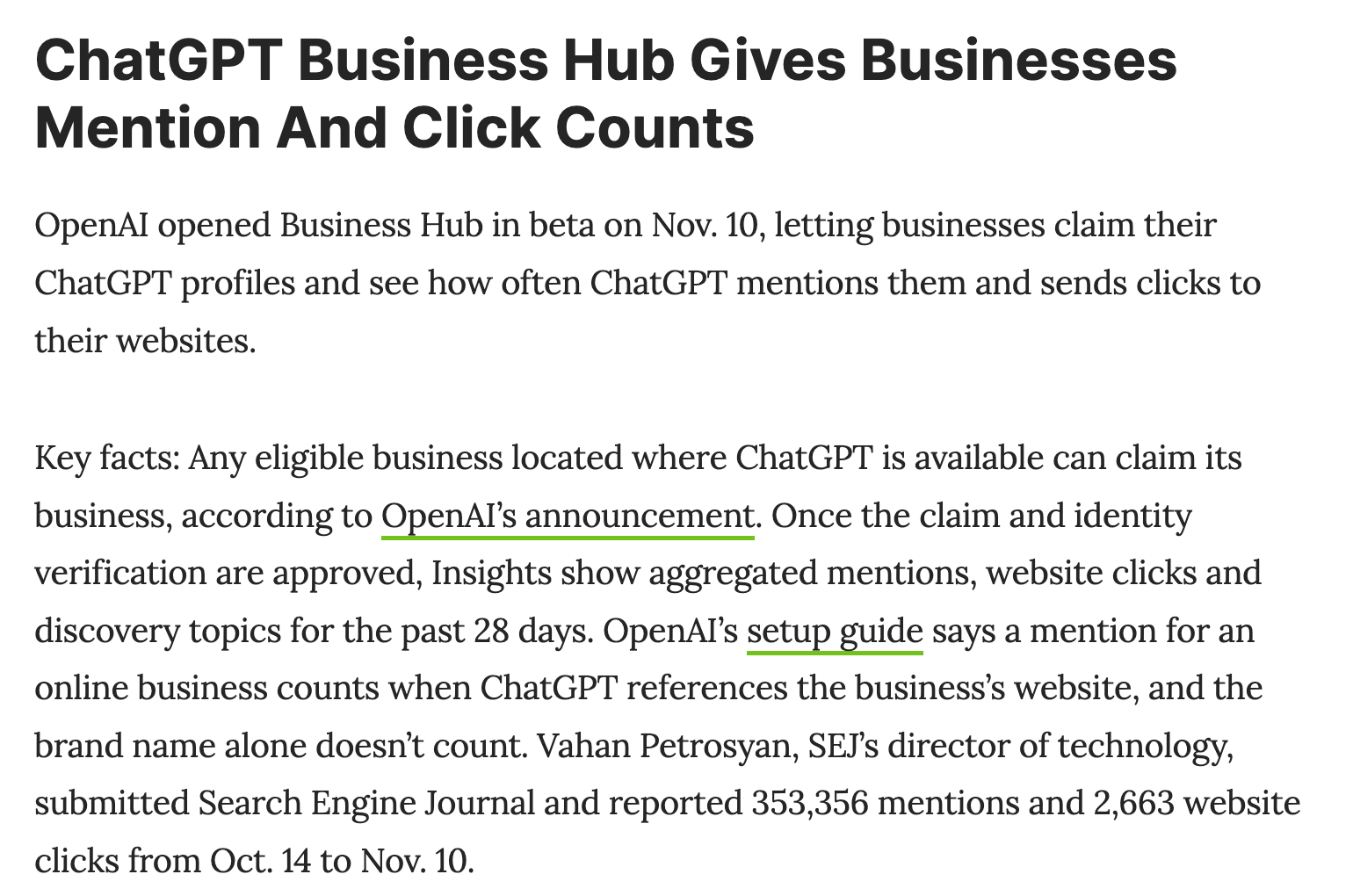
A mention is not a brand mention. For an online business, a mention counts only when ChatGPT references your website. Naming your brand without citing your site does not count. For a local business, it counts when ChatGPT shows a result for that location.
A click is not a visit. It is a recorded click on your link inside ChatGPT. It does not confirm that the page loaded, let alone that anyone bought anything.
You do not see prompts or conversations. Discovery topics are themes, not questions. There is no comparison with competitors, and small numbers are hidden: a blank metric does not mean zero.
The first public numbers show the gap between being cited and being visited. Search Engine Journal reported 353,356 mentions and 2,663 website clicks from 14 October to 10 November: about one click for every 133 mentions, or 0.75%. OtterlyAI, which sells AI visibility tracking, reported 0.59% for its own site over seven days. When ChatGPT cites you, it shapes the decision whether or not anyone clicks.
What do you agree to when you claim your business?
Using Business Hub means accepting the Businesses in ChatGPT Terms, last updated on 9 November 2026. These are the six clauses we think a business owner should read first. This is our reading, not legal advice.
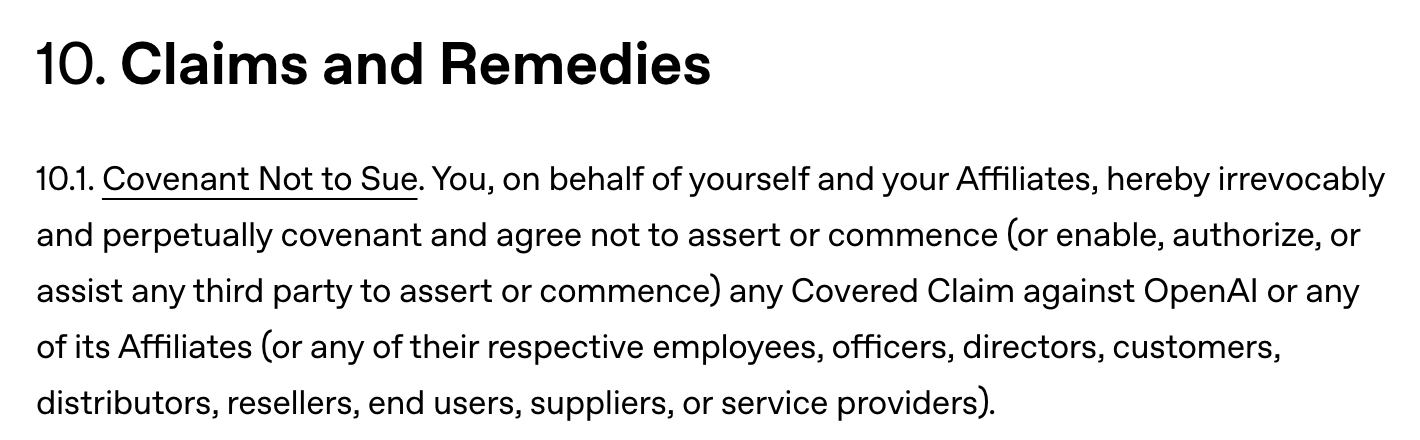
- You promise not to sue OpenAI over your website content. Section 10 is a covenant not to sue and a release. It covers claims related to the data you submit, to content published on your own websites at any time before or during the agreement, and to content you own on other websites. The only exception is a claim that OpenAI broke these terms. Section 10.3 adds that ending the agreement does not oblige OpenAI to change, delete or stop offering any product your data has been used in, and that you will not seek an injunction against it.
- Your data is not only for your listing. You provide it for display and for OpenAI’s “development, provision, and improvement of their products or services” (sections 2.2 and 11).
- Your basic details are licensed forever. For name, address, contact details, category, opening hours and website, the licence is “perpetual and irrevocable” (section 4.2). OpenAI can create, edit or supplement your listing whether or not you claim it (section 4.1). And only unpublished drafts can be deleted: OpenAI says its Support team cannot delete, unpublish or hide a published profile as part of a setup or ownership request.
- A product feed switches off your data mining opt-outs for OpenAI. If you add a feed, you must let OpenAI’s crawlers access your website, and any text and data mining opt-out you have reserved has no effect on OpenAI (section 3). In the EU, that opt-out is how rights holders reserve their content from text and data mining, AI training included.
- ChatGPT may phone you. By using Business Hub, you agree that OpenAI’s AI assistant may call your business on behalf of ChatGPT users (section 4.1). There is an opt-out form.
- You carry the risk. You indemnify OpenAI for claims about your listing, your agent and your products (section 9). You are responsible for what your agent says, whether or not you wrote or approved it (section 5.2). OpenAI guarantees no visibility, traffic or sales (section 8). And your Insights are confidential: you can share them with your own service providers, not publicly (section 6).
Should you claim your business in ChatGPT?
For most local shops, ecommerce stores and service businesses, we think yes. OpenAI can list you anyway, so it is better that the details are right, and Insights are first-party data from ChatGPT itself rather than an outside estimate. Do not expect a ranking boost: OpenAI says claiming does not guarantee more visibility, and that “advertising doesn’t influence ChatGPT’s independent answers”. The value is accuracy and measurement.
Pause and have a lawyer read section 10 first if:
- your website content is the product: publishers, media, course creators, photographers, software documentation;
- you have reserved your text and data mining rights, or you block AI crawlers on purpose;
- you have, or might have, a claim against OpenAI about your content.
Whether a clause like section 10 holds up under EU or national law is a question for a lawyer, not for us.
What we saw claiming ours
We claimed Living Off AI from Europe on 11 November and the claim went through. Business Hub shows our website access as confirmed. On 15 November, Insights still read “Unavailable” because we are below the reporting threshold, and the Agent builder says it is not available in our region yet. For a small European business, the useful part today is the profile itself.
FAQ
Is ChatGPT Business Hub free?
Yes, for now. Digiday reported that OpenAI’s VP of monetisation, Benji Shomair, did not rule out a paid model in the future.
Does claiming my business make ChatGPT recommend it more?
No. OpenAI says claiming does not guarantee more visibility. What it does is give ChatGPT accurate details to work with.
Can I claim my business in ChatGPT from Italy or elsewhere in Europe?
You can start a claim wherever ChatGPT is available, as long as the verification methods work for your business. Local shops and restaurants can currently claim only an existing US listing, and the Business Agent is US only.
Can I delete my ChatGPT business profile later?
Only an unpublished draft. Once published, the profile stays.
Is Business Hub the same as ChatGPT Business?
No. ChatGPT Business is a paid workspace plan for teams. Business Hub is free and is about how your business appears to other people in ChatGPT.
If you want a second opinion on whether to claim, or help setting up the profile and product feed, get in touch.
Sources
- OpenAI: Introducing Businesses in ChatGPT (10 November 2026)
- OpenAI Help Center: Setting up your business on ChatGPT
- Businesses in ChatGPT Terms (updated 9 November 2026)
- Business Agents Policy
- Digiday: OpenAI’s new business agents (10 November 2026)
- Search Engine Journal: SEO Pulse (November 2026)
- OtterlyAI: ChatGPT Business Hub
- OpenAI Developer Community: Introducing Businesses in ChatGPT in beta